Workstream US
- 3.1
- Rating
- 50.00K
- Installs
- Free
- Price

 Analysis by App-foxy
When I look at a business app for hourly teams, I start with a simple question: does it make the workday easier for the people who actually use it? Workstream US is built around that question. It comes from Workstream.is and presents itself as an on-the-go HR companion rather than a broad office suite. I found that focus useful because hourly employees and managers often need quick access to work-related tasks without opening a complicated desktop system.
Workstream US is a free business app for everyone, and its current release is v2.12.8. It runs on Android 8.0 or later, so it remains accessible on many older phones that hourly workers may still rely on. The app has passed the fifty-thousand-install mark and holds a 3.1 average from 116 ratings, with 52 written reviews. Those numbers suggest a product with a real user base but also a noticeably mixed experience, which matches my view: the idea is practical, while the value depends heavily on how a company has organized its HR processes around it.
What I would check before choosing an hourly-team HR app
My first decision criterion is not the number of buttons or the visual polish. It is whether the application fits the rhythm of the workplace. Hourly employees may check information between tasks, before a shift, or while commuting. Managers may need to handle a small request quickly rather than sit down for a long administrative session. An app that requires too much explanation loses its advantage immediately.
You May Also Like

 Blood Strike: 2.5 Anniversary
Blood Strike’s Loadouts Turn Every Drop Into a Tactical Gamble
A close look at Blood Strike’s custom loadouts: how fast access to signature weapons reshapes its battle royale rhythm, rewards preparation, and narrows the gap between fights.

 Pandora - Music & Podcasts
Pandora’s Music Is Easy to Start, but Harder to Recover
Pandora’s strength is its low-effort path from a seed to a station. Its weak spot is how much confidence it asks you to place in connection, setup, and quiet recovery.

 8 Ball Pool
8 Ball Pool Is Built on Rivalries, Rematches, and Routine
A close look at the rivalries, rematches, shared routines, and unanswered safety questions that turn a quick pool match into a persistent mobile community.

 Samsung Music
Samsung Music’s Quiet Strength Is Playing What You Already Own
Its reach comes less from spectacle than from dependable access to a personal library. That simplicity is both the app’s strongest retention engine and its ceiling.

 AccuWeather: Weather Radar
AccuWeather Review: A Quick, Clear Forecast for Everyday Decisions
For everyday plans, the best forecast is the one you can understand quickly. AccuWeather makes rain timing, radar, and local conditions easy to act on, with a few trade-offs.

 Hill Climb Racing
Why Hill Climb Racing Still Turns Crashes Into One More Run
A tiny car, a bumpy hill and one more upgrade: Hill Climb Racing keeps resurfacing because its simple chaos makes every near-miss feel personal.
More From Our News Desk



I would also ask who is expected to use it. Workstream US makes the most sense when employees, supervisors, and the company’s HR process are connected. It is not something I would judge as a standalone personal organizer. Its usefulness comes from being part of a workplace system, so a person downloading it without an employer workflow may find the experience limited or unclear.
The next question is consistency. Hourly teams often work across changing locations, shifts, and managers. A useful HR app should reduce the need to remember which paper form, email thread, or office contact handles a particular request. Workstream US is aimed at that kind of mobile access. In my view, its strongest promise is not that it replaces every HR tool, but that it gives employees a more direct route to routine work information.
There is also a practical device question. Requiring Android 8.0 or newer is reasonable for a current mobile app, but it still matters in workplaces where employees use older or shared phones. Before rolling it out, I would check the actual devices used by the team, not just the manager’s phone. A smooth experience for supervisors does not guarantee that every hourly employee will have the same result.
The employee’s point of view
From an employee perspective, the best mobile HR experience is one that does not feel like extra work. I would expect to open the app for a specific reason, find the relevant workplace information, complete the task, and leave. That may sound obvious, but it is especially important for hourly staff who are not sitting at a desk throughout the day.
Workstream US is more appealing than a traditional HR portal when the alternative is searching through old messages or asking a supervisor to repeat basic instructions. The mobile-first approach can make workplace administration feel closer to the rest of the employee’s daily tools. That convenience is most valuable for teams with many non-desk workers, rotating schedules, or several operating locations.
There is a trade-off, though. A focused app can only be as helpful as the information and processes connected to it. If a company has not configured its internal workflow clearly, employees may still need to contact a manager for answers. I would therefore treat the app as a channel for HR interaction, not as a substitute for clear policies or responsive management.
The manager’s point of view
Managers need a different kind of efficiency. They are often balancing staffing, customer needs, and employee questions at the same time. A mobile HR tool can be useful when it keeps routine requests from becoming a long chain of messages. In that situation, the benefit is less about advanced analysis and more about reducing small interruptions.
My advice to a manager considering this app would be to map the most common employee requests before introducing it. If the team regularly asks the same questions or submits the same types of HR requests, those are the situations where a mobile workflow can earn its place. If every case is unusual and requires personal discussion, the app may not remove much work.
I would also avoid making installation the entire rollout plan. Employees need to know when to use the app, what still requires a conversation, and where urgent issues belong. That distinction is important because a business app can create confusion if workers assume that every request receives the same response time or follows the same path.
Where Workstream US makes the strongest case
The clearest advantage is its focus on hourly teams. Many general productivity apps are designed around meetings, documents, or desk-based collaboration. Workstream US is positioned closer to the employee-management relationship, which makes it more relevant for retail, hospitality, service operations, and other environments where staff may rarely use a computer during a shift.
I especially like the idea of having a dedicated place for workplace tasks instead of mixing them with personal messaging. When a manager answers an HR question in a private chat, the information can be difficult to find later and may not be visible to the right people. A structured business app can encourage a cleaner process, even when the underlying task is simple.
Another strength is accessibility. Since the app is free and rated for everyone, the barrier to trying it is relatively low. That does not mean the full workplace experience costs nothing, because a company’s own HR arrangements and implementation decisions still matter. It does mean an individual employee is not being asked to purchase a specialized tool simply to participate in routine work administration.
The app’s size also tells me something useful. With over fifty thousand installs, it is not an obscure experiment that nobody has encountered. At the same time, the 3.1 average rating is not strong enough for me to recommend it without qualification. I would read the rating as a reason to test the workflow with a small group first, especially if the company has a large hourly workforce.
A realistic day-to-day example
Imagine a restaurant employee who is away from a desk and needs to deal with a routine workplace matter before the next shift. With a conventional setup, that person might send a text to a supervisor, wait for a reply, and then search through a separate email or paper document for the next step. A dedicated HR app can make the first contact more orderly and reduce the chance that the request disappears in a busy conversation.
For the manager, the benefit is not necessarily that the issue vanishes. The benefit is that the request begins in the right place. That makes it easier to separate a routine HR question from a scheduling emergency or a customer issue. In a busy hourly environment, that small separation can be more valuable than a long list of features.
I would use the same principle for a multi-location business. A worker may not know which local manager handles a particular administrative question, while the company may want a consistent route for employees in every location. Workstream US can be a sensible front door for that process, provided the business keeps its instructions current and teaches employees what to expect after submitting a request.
Three practical insights that are easy to miss
First, I would test the app during the least convenient part of the workday, not only in a calm office demonstration. A tool for hourly teams needs to make sense when someone has limited time and attention. Ask a few employees to complete a normal task using their own phones and note where they hesitate. That test reveals more than a manager clicking through the app in a meeting.
Second, I would treat onboarding as part of the product decision. The app may be easy to install, but the company still needs a clear message explaining its role. A short internal guide should state which requests belong in the app, which should go directly to a supervisor, and what employees should do if they cannot access their account or device. This prevents the common mistake of blaming the app for a process that was never explained.
Third, I would review the app from the perspective of an employee who works in more than one place. If the team moves between branches, sites, or departments, the company should verify that the user experience does not depend on local knowledge. A mobile HR tool earns real value when it reduces that kind of uncertainty. If employees still need to remember several separate procedures, the business may not be using the app to its full potential.
A fourth consideration is the boundary between convenience and recordkeeping. Mobile access is excellent for starting a request or finding workplace information, but important employment matters may still deserve careful documentation and human review. I would not encourage a company to push sensitive or complicated conversations into an app simply because it is available. The strongest setup uses the app for organized access while preserving appropriate personal support.
Where a different type of tool may fit better
Workstream US is not automatically the best choice for every business. If your main need is project collaboration, shared documents, customer relationship management, or detailed payroll administration, a specialized platform in that category may be a better fit. The app’s hourly-team orientation is an advantage only when that is the problem you are trying to solve.
I would also be cautious with a very small team where everyone already communicates directly and HR requests are rare. In that setting, adding an app may create another place to check without saving enough time. A simple, well-organized process can be better than a dedicated tool when the volume of requests is low and the manager is always available.
At the other end of the scale, a larger organization may need deeper connections between HR, payroll, scheduling, compliance, and reporting. I would not assume that a mobile employee-facing app covers all those areas just because it is described as an HR solution. Businesses with complex requirements should compare the complete workflow, not just the convenience of having an app on a phone.
The mixed rating is another reason to compare alternatives carefully. A 3.1 average does not tell me exactly why every user was dissatisfied, but it does tell me that the experience has not been uniformly smooth. I would pay particular attention to login reliability, clarity of instructions, and how quickly employees can recover from a problem. Those details often determine whether a workplace app becomes part of the routine or gets ignored.
There is also a human alternative worth considering: a trained HR contact supported by a simple internal knowledge base. That approach can be more effective when employees need judgment, reassurance, or help with unusual situations. Workstream US is more compelling when the company wants to make routine access consistent, not when it is trying to remove the human side of HR.
What switching would really involve
Moving from email, paper, or informal messaging to a dedicated app is not just a download. The company must decide which existing processes will move first, who owns responses, and how old instructions will be retired. If both the old and new methods remain active indefinitely, employees may not know which one is official, and managers may end up monitoring two channels.
I would start with one narrow workflow rather than moving everything at once. Choose a routine employee request, explain the new path, and observe whether the team actually uses it. This approach makes it easier to identify friction before expanding the rollout. It also gives employees a reason to open the app instead of asking them to learn a tool with no immediate purpose.
Switching costs include trust as well as time. Employees need confidence that their request has reached the right place and that they will not be penalized for using the new process incorrectly. Managers need confidence that they will not miss something important. Clear ownership and a backup contact are therefore just as important as the app installation itself.
I would also plan for people who cannot use the app at a particular moment. A dead phone battery, an older device, or a connectivity problem should not prevent an employee from getting essential workplace help. Workstream US can be the preferred route without being the only route. That is a sensible policy for any mobile-first HR process.
My recommendation after weighing the trade-offs
I recommend Workstream US for companies that specifically need a mobile HR channel for hourly employees and are willing to support it with clear internal procedures. Its focus is more relevant than a generic office productivity app for teams that spend most of their working time away from desks. The free price and broad age rating make a controlled trial straightforward, while support for Android 8.0 or later helps include older devices.
I would not recommend adopting it blindly across a large organization based only on the store summary. The 3.1 average rating deserves attention, and the app’s value will depend on how well the employer’s workflow is configured. Start with a small group, choose one common use case, and ask employees whether the app actually saves them a message, a search, or a trip to a manager.
For an hourly worker, I would try it if my employer has clearly explained what it is for and where it fits alongside normal supervisor communication. For an employer, I would choose it when the main problem is scattered HR access rather than complex enterprise administration. If your needs center on payroll depth, advanced workforce planning, or full business operations, compare it with a broader platform instead.
My final view is cautiously positive. Workstream US has a sensible purpose and a useful audience, but it should be judged as part of a workplace process, not as a magic replacement for HR support. When the company gives it a clear job, trains people briefly, and keeps a human fallback available, it can make routine employee communication more manageable. When those foundations are missing, the app is unlikely to fix the underlying confusion.
That makes the decision fairly clear: choose Workstream US for focused, mobile HR access in hourly teams, but test the real employee workflow before committing to a full rollout. It is a practical candidate for a targeted trial, not a universal answer for every business department.
FAQs for Workstream US
01What is Workstream US, and who is it designed for?
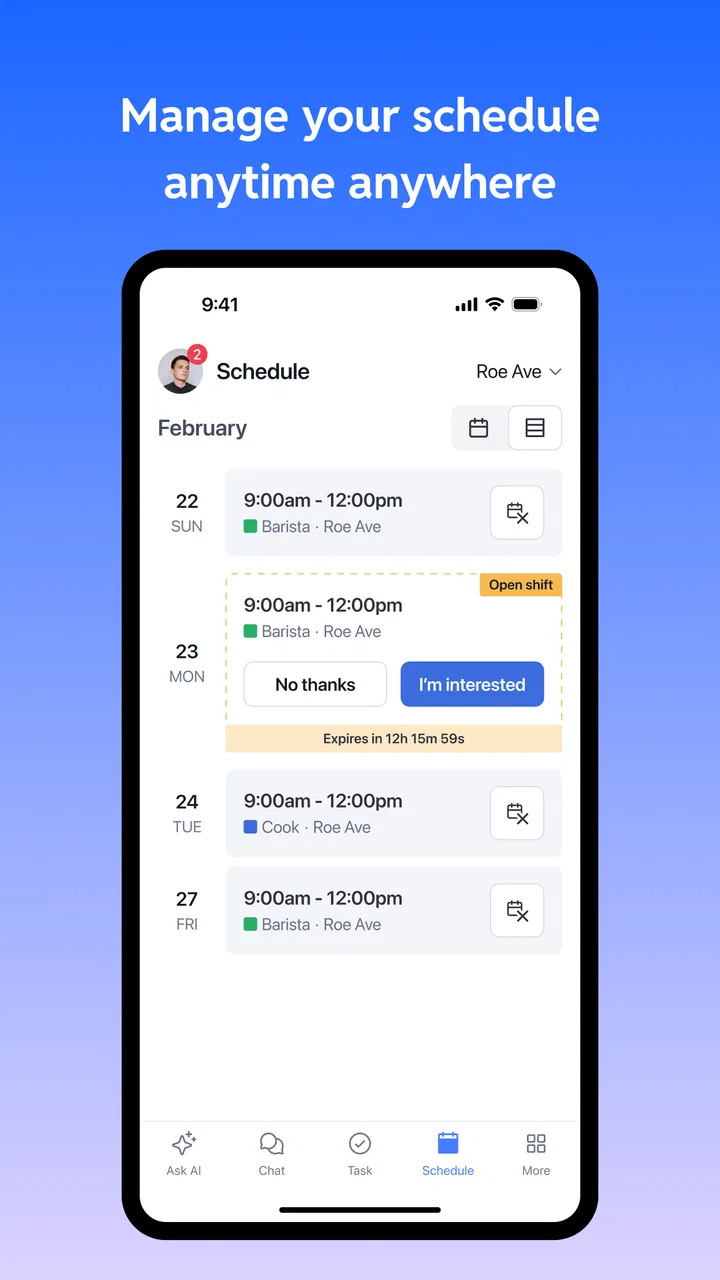
Workstream US is a workforce management and employee communication app designed primarily for businesses and their employees. It can help users view schedules, receive workplace updates, communicate with managers or coworkers, and access work-related information from a mobile device. The exact tools available may depend on the employer’s Workstream setup, employee role, and enabled subscription features.
02How do I log in to Workstream US?
To use Workstream US, you generally need an account created or activated by your employer. Login details may include your work email address, phone number, employee ID, or a password provided during registration. If you cannot sign in, check that you are using the correct company credentials and app version. For account, invitation, or password problems, contact your manager or workplace administrator.
03What features can employees use in Workstream US?
Depending on how your organization configures the app, Workstream US may provide access to employee schedules, shift information, time-related tools, announcements, messaging, task updates, documents, and other workplace resources. Not every user will see the same features. Managers and administrators may have additional controls, while regular employees typically receive only the tools and information relevant to their position.
04Does Workstream US require access to my personal information or location?
Workstream US may request permissions such as notifications, camera access, storage, contacts, or location, depending on the features enabled by your employer. For example, location services could be used for workplace-related functions such as attendance or site verification. Before accepting permissions, review the explanations shown by the app and your company’s privacy policy. You can manage many permissions through your device settings.
05Is Workstream US free to download and use?
The Workstream US app may be free to download from the relevant app store, but access to its workplace services is usually connected to an employer’s account or business subscription. Employees normally do not purchase the main service individually, although specific organizations may apply their own policies. Confirm with your employer whether your workplace supports the app and which features are included before downloading it.
Pros
- Centralizes work updates
- tasks
- and communication in one place.
- Helps teams track progress and maintain visibility across projects.
- Supports faster collaboration between distributed team members.
- Makes it easier to organize priorities and follow deadlines.
- Useful for reducing scattered messages across multiple work tools.
Cons
- May require onboarding before new users understand the workflow.
- Notification volume can become distracting for highly active teams.
- Some features may depend on the organization’s subscription or setup.
- Performance can vary when handling large teams or busy workspaces.
- Limited value for users who only need simple personal task management.

Workstream US
Gallery